mirror of
https://github.com/felixrieseberg/windows95.git
synced 2026-05-14 18:31:59 +00:00
Compare commits
30 Commits
| Author | SHA1 | Date | |
|---|---|---|---|

|
a28aef8cf0 | ||
|
|
d2b8d9dd35 | ||
|
|
3802734ef0 | ||
|
|
1f478676f1 | ||
|
|
d19bbeee8f | ||
|
|
1e130b6140 | ||
|
|
e1c5992ff9 | ||
|
|
e879760678 | ||
|
|
2a11633171 | ||
|
|
b68d54ae62 | ||
|
|
9600630340 | ||
|
|
bae1909793 | ||
|
|
ee9e138034 | ||
|
|
5558671688 | ||
|
|
9a46ed5080 | ||
|
|
2c160d0f7f | ||
|
|
aafab62707 | ||
|
|
78126a57cb | ||
|
|
f5256ec7a2 | ||
|
|
6c1687c9a5 | ||
|
|
2c041115d0 | ||
|
|
987dc57309 | ||
|
|
614b18969d | ||
|
|
264ef7d069 | ||
|
|
e85cf4f1b2 | ||
|
|
e987da5460 | ||
|
|
a542639bc3 | ||
|
|
5d1928beb2 | ||
|
|
f1b657a53b | ||
|
|
6aa39e66ec |
45
.appveyor.yml
Normal file
45
.appveyor.yml
Normal file
@@ -0,0 +1,45 @@
|
||||
environment:
|
||||
matrix:
|
||||
- nodejs_version: "10"
|
||||
|
||||
init:
|
||||
- git config --global core.symlinks true
|
||||
|
||||
install:
|
||||
# Setup the code signing certificate
|
||||
- ps: >-
|
||||
if (Test-Path Env:\WINDOWS_CERTIFICATE_P12) {
|
||||
$workingDirectory = Convert-Path (Resolve-Path -path ".")
|
||||
$filename = "$workingDirectory\cert.p12"
|
||||
$bytes = [Convert]::FromBase64String($env:WINDOWS_CERTIFICATE_P12)
|
||||
[IO.File]::WriteAllBytes($filename, $bytes)
|
||||
}
|
||||
- ps: Install-Product node $env:nodejs_version x64
|
||||
- node --version
|
||||
- npm ci
|
||||
- ps: cd ./src/
|
||||
- ps: mkdir images
|
||||
- ps: cd images
|
||||
- ps: Start-FileDownload 'https://1drv.ws/u/s!AkfaAw_EaahOkulh8rA41x2phgfYXQ' -FileName images.zip -Timeout 600000
|
||||
- ps: 7z x images.zip -y -aoa
|
||||
- ps: Remove-Item images.zip
|
||||
- ps: Remove-Item __MACOSX -Recurse -ErrorAction Ignore
|
||||
- ps: cd ../..
|
||||
- ps: Tree ./src /F
|
||||
|
||||
cache:
|
||||
- '%APPDATA%\npm-cache -> appveyor.yml'
|
||||
|
||||
test_script:
|
||||
- node --version
|
||||
- npm --version
|
||||
- npm run lint
|
||||
|
||||
artifacts:
|
||||
- path: 'out\make\squirrel.windows\**\*.exe'
|
||||
|
||||
build_script:
|
||||
- if %APPVEYOR_REPO_TAG% EQU false npm run make
|
||||
- if %APPVEYOR_REPO_TAG% EQU true npm run publish
|
||||
- if %APPVEYOR_REPO_TAG% EQU true npm run publish -- --arch=ia32
|
||||
- ps: Tree ./out/make /F
|
||||
64
.travis.yml
Normal file
64
.travis.yml
Normal file
@@ -0,0 +1,64 @@
|
||||
language: node_js
|
||||
node_js: "12"
|
||||
os:
|
||||
- linux
|
||||
- osx
|
||||
dist: trusty
|
||||
osx_image: xcode8.3
|
||||
sudo: false
|
||||
|
||||
cache:
|
||||
directories:
|
||||
- node_modules
|
||||
- $HOME/.cache/electron
|
||||
|
||||
addons:
|
||||
apt:
|
||||
packages:
|
||||
- fakeroot
|
||||
- rpm
|
||||
|
||||
branches:
|
||||
only:
|
||||
- master
|
||||
- /^v\d+\.\d+\.\d+/
|
||||
|
||||
install:
|
||||
- npm install
|
||||
- mkdir -p ./src/images
|
||||
- cd ./src/images
|
||||
- wget -O images.zip https://1drv.ws/u/s!AkfaAw_EaahOkulh8rA41x2phgfYXQ
|
||||
- unzip -o images.zip
|
||||
- rm images.zip
|
||||
- rm -r __MACOSX
|
||||
- cd ../..
|
||||
- ls src
|
||||
- ls src/images
|
||||
- |
|
||||
if [[ "$TRAVIS_OS_NAME" == "osx" && "$TRAVIS_SECURE_ENV_VARS" == "true" ]]; then
|
||||
export CERTIFICATE_P12=cert.p12;
|
||||
echo $MACOS_CERT_P12 | base64 --decode > $CERTIFICATE_P12;
|
||||
export KEYCHAIN=build.keychain;
|
||||
# Create the keychain with a password
|
||||
security create-keychain -p travis $KEYCHAIN;
|
||||
# Make the custom keychain default, so xcodebuild will use it for signing
|
||||
security default-keychain -s $KEYCHAIN;
|
||||
# Unlock the keychain
|
||||
security unlock-keychain -p travis $KEYCHAIN;
|
||||
# Add certificates to keychain and allow codesign to access them
|
||||
# Apple Worldwide Developer Relations Certification Authority
|
||||
security import ./tools/certs/apple.cer -k ~/Library/Keychains/$KEYCHAIN -T /usr/bin/codesign
|
||||
# Developer Authentication Certification Authority
|
||||
security import ./tools/certs/dac.cer -k ~/Library/Keychains/$KEYCHAIN -T /usr/bin/codesign
|
||||
# Developer ID Felix
|
||||
security import $CERTIFICATE_P12 -k $KEYCHAIN -P $MACOS_CERT_PASSWORD -T /usr/bin/codesign 2>&1 >/dev/null;
|
||||
rm $CERTIFICATE_P12;
|
||||
security set-key-partition-list -S apple-tool:,apple: -s -k travis $KEYCHAIN
|
||||
# Echo the identity
|
||||
security find-identity -v -p codesigning
|
||||
fi
|
||||
script:
|
||||
- npm run lint
|
||||
- if test -z "$TRAVIS_TAG"; then npm run make; fi
|
||||
|
||||
after_success: if test -n "$TRAVIS_TAG"; then npm run publish; fi
|
||||
17
HELP.md
17
HELP.md
@@ -14,11 +14,22 @@ button to start your virtual machine again.
|
||||
|
||||
## I want to install additional apps or games
|
||||
|
||||
If you are running Windows 10, macOS, or Linux, you can probably "mount" the
|
||||
If you are running macOS, or Linux, you can probably "mount" the
|
||||
virtual hard drive used by `windows95` to add files. Hit the "Show Disk Image"
|
||||
button in the lower right of the app, which will take you to the disk image.
|
||||
On both Windows 10 and macOS, double-click the disk image to open it.
|
||||
|
||||
On macOS, double-click the disk image to open it.
|
||||
|
||||
On Windows 10, Windows will _think_ that it can open up the image, but will
|
||||
actually fail to do so. Use a tool [like OSFMount][osfmount] to mount your
|
||||
disk image.
|
||||
|
||||
On Linux, search the Internet for instructions on how to mount an `img` disk
|
||||
image on your distribution.
|
||||
image on your distribution. It's likely that you'll be able to run `mount`
|
||||
with the image as input.
|
||||
|
||||
[osfmount]: https://www.osforensics.com/tools/mount-disk-images.html
|
||||
|
||||
## What's the FrontPage Username and Password?
|
||||
Username: windows95
|
||||
Password: password
|
||||
|
||||
15
README.md
15
README.md
@@ -2,18 +2,16 @@
|
||||
|
||||
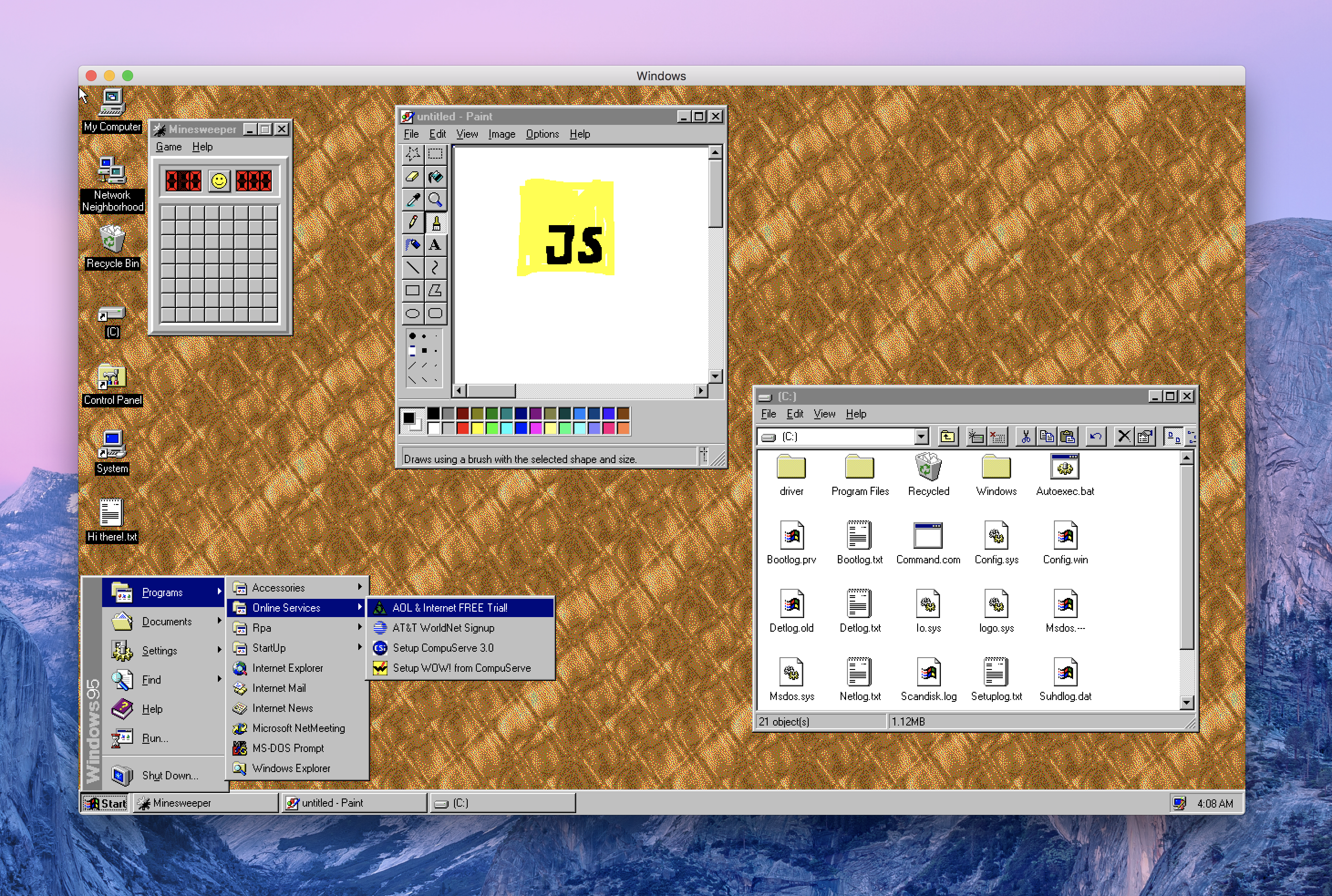
This is Windows 95, running in an [Electron](https://electronjs.org/) app. Yes, it's the full thing. I'm sorry.
|
||||
|
||||
Interested in Electron? Join as at [CovalenceConf](http://covalenceconf.com) in San Francisco!
|
||||
|
||||
## Downloads
|
||||
| | Windows | macOS | Linux |
|
||||
|---------------------|-----------------------------------------------------------------------------------------------------------------------------------------------------------------------------------------------------------------------------------------------------------------------------|---------------------------------------------------------------------------------------------------------------|---------------------------------------------------------------------------------------------------------------------------------------------------------------------------------------------------------------------------------------------|
|
||||
| Standalone Download | 📦[Standalone, 32-bit](https://github.com/felixrieseberg/windows95/releases/download/v1.4.0/windows95-1.4.0-win32-standalone-ia32.zip) <br /> 📦[Standalone, 64-bit](https://github.com/felixrieseberg/windows95/releases/download/v1.4.0/windows95-1.4.0-win32-standalone-x64.zip) | 📦[Standalone](https://github.com/felixrieseberg/windows95/releases/download/v1.4.0/windows95-macos-1.4.0.zip) | |
|
||||
| Installer | 💽[Setup, 64-bit](https://github.com/felixrieseberg/windows95/releases/download/v1.4.0/windows95-1.4.0-setup-win32-x64.exe) <br /> 💽[Setup, 32-bit](https://github.com/felixrieseberg/windows95/releases/download/v1.4.0/windows95-1.4.0-setup-win32-ia32.exe) | | 💽[deb, 64-bit](https://github.com/felixrieseberg/windows95/releases/download/v1.4.0/windows95-linux-1.4.0_amd64.deb) <br /> 💽[rpm, 64-bit](https://github.com/felixrieseberg/windows95/releases/download/v1.4.0/windows95-linux-1.4.0.x86_64.rpm) |
|
||||
| Standalone Download | 📦[Standalone, 32-bit](https://github.com/felixrieseberg/windows95/releases/download/v2.0.0/windows95-2.0.0-win32-standalone-ia32.zip) <br /> 📦[Standalone, 64-bit](https://github.com/felixrieseberg/windows95/releases/download/v2.0.0/windows95-2.0.0-win32-standalone-x64.zip) | 📦[Standalone](https://github.com/felixrieseberg/windows95/releases/download/v2.0.0/windows95-macos-2.0.0.zip) | |
|
||||
| Installer | 💽[Setup, 64-bit](https://github.com/felixrieseberg/windows95/releases/download/v2.0.0/windows95-2.0.0-setup-win32-x64.exe) <br /> 💽[Setup, 32-bit](https://github.com/felixrieseberg/windows95/releases/download/v2.0.0/windows95-2.0.0-setup-win32-ia32.exe) | | 💽[deb, 64-bit](https://github.com/felixrieseberg/windows95/releases/download/v2.0.0/windows95-linux-2.0.0_amd64.deb) <br /> 💽[rpm, 64-bit](https://github.com/felixrieseberg/windows95/releases/download/v2.0.0/windows95-linux-2.0.0.x86_64.rpm) |
|
||||
|
||||
|
||||
|
||||
## Does it work?
|
||||
Yes! Quite well, actually - on macOS, Windows, and Linux.
|
||||
Yes! Quite well, actually - on macOS, Windows, and Linux. Bear in mind that this is written entirely in JavaScript, so please adjust your expectations.
|
||||
|
||||
## Should this have been a native app?
|
||||
Absolutely.
|
||||
@@ -23,9 +21,6 @@ You'll likely be better off with an actual virtualization app, but the short ans
|
||||
@DisplacedGamers](https://youtu.be/xDXqmdFxofM) I can recommend that you switch to a resolution of
|
||||
640x480 @ 256 colors before starting DOS games - just like in the good ol' days.
|
||||
|
||||
## How's the code?
|
||||
This only works well by accident and was mostly a joke. The code quality is accordingly. Thus it should not be used for anything other than personal amusement.
|
||||
|
||||
## Credits
|
||||
|
||||
99.999% of the work was done over at [v86](https://github.com/copy/v86/) by Copy.
|
||||
@@ -46,7 +41,11 @@ Once you've done so, run `npm install` and `npm start` to run your local build.
|
||||
|
||||
## Other Questions
|
||||
|
||||
* [MS-DOS seems to brick the screen](./HELP.md#ms-dos-seems-to-brick-the-screen)
|
||||
* [Windows 95 is stuck in a bad state](./HELP.md#windows-95-is-stuck-in-a-bad-state)
|
||||
* [I want to install additional apps or games](./HELP.md#i-want-to-install-additional-apps-or-games)
|
||||
* [Running in Docker](./docs/docker-instructions.md)
|
||||
* [Running in an online VM with Kubernetes and Gitpod](./docs/docker-kubernetes-gitpod.md)
|
||||
|
||||
## License
|
||||
|
||||
|
||||
@@ -27,7 +27,13 @@ Note: You may need to run `xhost +` on your system to allow connections to the X
|
||||
* [XQuartz](https://www.xquartz.org/)
|
||||
* [Docker](http://docker.io)
|
||||
|
||||
1. Start XQuartz ,go to "Preferences -> Security " ,and check the box "allow connections from network clients"
|
||||
2. restart XQuartz
|
||||
3. In the terminal ,run "xhost +"
|
||||
4. run "docker run -it -e DISPLAY=host.docker.internal:1 toolboc/windows95"
|
||||
1. Start XQuartz, go to `Preferences` -> `Security`, and check the box `Allow connections from network clients`
|
||||
2. Restart XQuartz
|
||||
3. In the terminal, run
|
||||
```
|
||||
xhost +
|
||||
```
|
||||
4. run
|
||||
```
|
||||
docker run -it -e DISPLAY=host.docker.internal:1 toolboc/windows95
|
||||
```
|
||||
|
||||
4
docs/docker-kubernetes-gitpod.md
Normal file
4
docs/docker-kubernetes-gitpod.md
Normal file
@@ -0,0 +1,4 @@
|
||||
## Running an online version of windows95
|
||||
You can also run windows95 in Electron, in a virtual X server, in a JavaScript VNC client, in a Kubernetes workspace. What could go wrong?
|
||||
|
||||
[](https://gitpod.io/#https://github.com/felixrieseberg/windows95)
|
||||
@@ -3,9 +3,7 @@ const package = require('./package.json');
|
||||
|
||||
module.exports = {
|
||||
packagerConfig: {
|
||||
asar: {
|
||||
unpack: '**/images/*.img'
|
||||
},
|
||||
asar: false,
|
||||
icon: path.resolve(__dirname, 'assets', 'icon'),
|
||||
appBundleId: 'com.felixrieseberg.windows95',
|
||||
appCategoryType: 'public.app-category.developer-tools',
|
||||
@@ -37,7 +35,7 @@ module.exports = {
|
||||
},
|
||||
{
|
||||
name: '@electron-forge/maker-zip',
|
||||
platforms: ['darwin']
|
||||
platforms: ['darwin', 'win32']
|
||||
},
|
||||
{
|
||||
name: '@electron-forge/maker-deb',
|
||||
@@ -46,10 +44,19 @@ module.exports = {
|
||||
{
|
||||
name: '@electron-forge/maker-rpm',
|
||||
platforms: ['linux']
|
||||
},
|
||||
}
|
||||
],
|
||||
publishers: [
|
||||
{
|
||||
name: '@electron-forge/maker-flatpak',
|
||||
platforms: ['linux']
|
||||
name: '@electron-forge/publisher-github',
|
||||
config: {
|
||||
repository: {
|
||||
owner: 'felixrieseberg',
|
||||
name: 'windows95'
|
||||
},
|
||||
draft: true,
|
||||
prerelease: true
|
||||
}
|
||||
}
|
||||
]
|
||||
};
|
||||
|
||||
2292
package-lock.json
generated
2292
package-lock.json
generated
File diff suppressed because it is too large
Load Diff
21
package.json
21
package.json
@@ -1,7 +1,7 @@
|
||||
{
|
||||
"name": "windows95",
|
||||
"productName": "windows95",
|
||||
"version": "1.5.0",
|
||||
"version": "2.1.0",
|
||||
"description": "Windows 95, in an app. I'm sorry.",
|
||||
"main": "src/index.js",
|
||||
"scripts": {
|
||||
@@ -29,18 +29,19 @@
|
||||
},
|
||||
"dependencies": {
|
||||
"electron-squirrel-startup": "^1.0.0",
|
||||
"fs-extra": "^7.0.1",
|
||||
"fs-extra": "^8.0.1",
|
||||
"update-electron-app": "^1.3.0"
|
||||
},
|
||||
"devDependencies": {
|
||||
"@electron-forge/cli": "^6.0.0-beta.32",
|
||||
"@electron-forge/maker-deb": "^6.0.0-beta.32",
|
||||
"@electron-forge/maker-flatpak": "^6.0.0-beta.32",
|
||||
"@electron-forge/maker-rpm": "^6.0.0-beta.32",
|
||||
"@electron-forge/maker-squirrel": "^6.0.0-beta.32",
|
||||
"@electron-forge/maker-zip": "^6.0.0-beta.32",
|
||||
"electron": "4.0.4",
|
||||
"node-abi": "^2.6.0",
|
||||
"@electron-forge/cli": "^6.0.0-beta.34",
|
||||
"@electron-forge/maker-deb": "^6.0.0-beta.34",
|
||||
"@electron-forge/maker-flatpak": "^6.0.0-beta.34",
|
||||
"@electron-forge/maker-rpm": "^6.0.0-beta.34",
|
||||
"@electron-forge/maker-squirrel": "^6.0.0-beta.34",
|
||||
"@electron-forge/maker-zip": "^6.0.0-beta.34",
|
||||
"@electron-forge/publisher-github": "^6.0.0-beta.34",
|
||||
"electron": "5.0.1",
|
||||
"node-abi": "^2.8.0",
|
||||
"standard": "^12.0.1"
|
||||
}
|
||||
}
|
||||
|
||||
@@ -4,7 +4,14 @@ const path = require('path')
|
||||
|
||||
const ES6_PATH = path.join(__dirname, 'renderer')
|
||||
|
||||
protocol.registerStandardSchemes(['es6'])
|
||||
protocol.registerSchemesAsPrivileged([
|
||||
{
|
||||
scheme: 'es6',
|
||||
privileges: {
|
||||
standard: true
|
||||
}
|
||||
}
|
||||
])
|
||||
|
||||
async function setupProtocol () {
|
||||
protocol.registerBufferProtocol('es6', async (req, cb) => {
|
||||
|
||||
Reference in New Issue
Block a user